Sprang

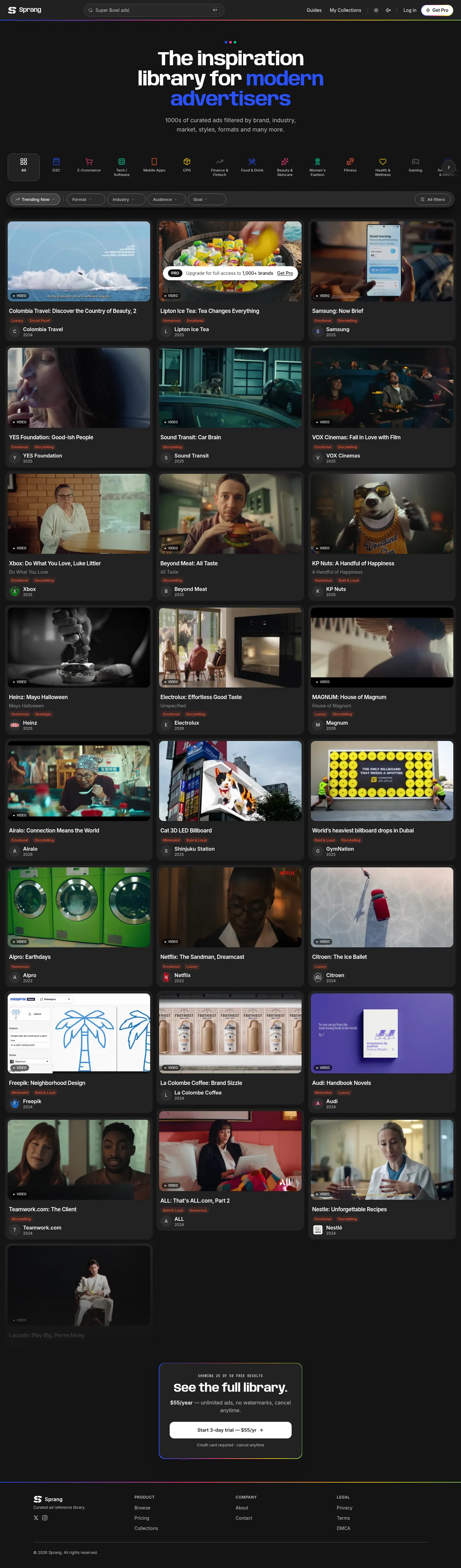
A curated library of 1,000+ ads you can browse by brand, industry, market, style and format.
- Category
- Our products
- Platform
- Web
Problem
Good advertising references are scattered, and hard to filter.
Approach
Browse ads by brand, industry, market, style and format, save them to collections, and follow guides and trending ads.
Free to browse with watermarks; Pro removes the limits.
What we built
A product with the parts of a small media company inside it.
Subscription pricing
A free tier with watermarks and a Pro plan that removes the limits, with accounts and billing around them.
Plans and access levels
What you can see and save depends on the account you have, from a visitor to a Pro member.
AI-written descriptions
Every ad gets a clear description in the same shape, drafted by AI so a large library stays uniform.
AI that improves the text for users
Tools such as Claude sit in the workflow to make descriptions clearer for the people searching.
Tagging and structure
Brand, industry, market, style and format on every ad, so the filters people use actually work.
Search
Search across the whole library, with filters, collections, guides and trending on top.
Video and images at scale
Video and still ads delivered to lots of people at once, in the right formats for each screen.
Tools to manage the library
A CMS set up for the team to add, edit, tag and organise thousands of ads and collections without developers.
The problem: video sets the bill
A library of 1,000+ video ads only works if each one is cheap to store and quick to play. Video is the heaviest thing we serve, so it decides what the product costs to run.
Two choices do most of the work: where the files live and are delivered from, and how they are encoded. We tested both before settling on a stack.
What we tested for hosting and delivery
We tried several storage, CDN and video services before settling a stack. They differ less in features than in how you pay, so the cost of a library with a lot of video depends on which meter you are standing on.
| Option | What it gives you | How you pay | Where it fits |
|---|---|---|---|
| Cloudflare Stream | Upload, encoding, adaptive streaming and a player as one service. | By minutes of video stored and minutes delivered. Encoding and ingress are free. | You want one managed service and a library where length and views are easy to forecast. |
| Cloudflare R2 | S3-style object storage with no fee for data going out to the internet. | By GB stored and by requests. Egress is free. | You encode yourself, serve large files and want egress off the bill. |
| Bunny Stream | Managed video: encoding to several resolutions, adaptive streaming, a player, security and a CDN. | By storage and delivery per GB. No encoding fee. | You want a managed pipeline billed by bandwidth, not minutes. |
| Bunny Storage and CDN | Cheap per-GB storage in chosen regions and a pull-zone CDN. | Per GB stored and per GB delivered. Delivery prices vary a lot by region. | You handle encoding elsewhere and serve mostly to regions where delivery is cheap. |
| AWS S3, CloudFront and MediaConvert | Object storage, a CDN and a transcoding service that can produce newer codecs such as HEVC and AV1. | S3 by GB, requests and data out. CloudFront by transfer and requests. MediaConvert by output minute, with multipliers for newer codecs. | You already live on AWS, or need newer codecs and broadcast-style packaging, and will model the cost levers. |
Also worth a look: Mux, a video-specialist API with a free basic-quality encode, and Backblaze B2, cheap storage with generous free egress. Pricing models change, so check each vendor’s page before you decide.
Codecs: smaller files against wider support
The codec decides how many bytes a video takes. Newer ones compress better but need more encoding work and are not played everywhere, so a library needs a baseline that always works.
| Codec | What it is | Licensing | Where it plays |
|---|---|---|---|
| H.264 (AVC) | The long-standing baseline. | Patented. Commercial use needs a licence; streaming video free to viewers is covered by the main licensing pool. | Every current browser. |
| H.265 (HEVC) | Roughly half the size of H.264 at comparable quality, in theory. | Patented, with more than one licensing pool to check. | Wide, but conditional on the device and the operating system. |
| VP9 | Google’s open codec, comparable to HEVC at similar bitrates. | Open and royalty-free. | Every current browser. |
| AV1 | The Alliance for Open Media codec, the best compression of the four. | Royalty-free and open. | Wide in recent browsers. Safari needs recent hardware. |
Sources: MDN’s video codec guide and the Alliance for Open Media. Browser support moves quickly, so check caniuse.com before you rely on it.
What we do with it
We settled on Bunny CDN: a low-cost, fast and efficient way to manage the S3 and streaming layers for the video content.
The aim is the smallest file that still plays everywhere, served from close to the viewer, with a poster showing first so nothing waits on a download.
Outcome
Live at sprang.ad, with more than 1,000 curated ads.
See it live
Next project
Hurdle